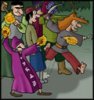
If you look at this detail of my second panel, I used two different methods: I traced the dwarves on the left over scanned pencils, and I scanned the ink of the squids to the right later as an afterthought. As you see, there isn't a huge difference, the lines of the squids look acceptably clean too.
There are dozens of tutorials around for Photoshop webcomic art that explain how to get sharper lines (basically changing the levels of black and white in your scanned lineart), how to make the white transparent so you can colour in a layer under the lineart etc. etc., it's really an amazing application.
Like someone else previously said, don't use ballpoint pens if you can possibly help it. I find that the king of smooth lines is the good old coquill dipping pen, though it takes time to master and dipping and going through pen points can be a pain in the rear. For thicker outlines, I cheat and use sharpe markers or a Vis-a-Vis marker. They turn out smooth on the scanner. Others probably have other methods that work just as well, but this is what I personally do.
When you're scanning, make sure you settle for no less than 300 dpi, at my job I've seen too many people scan things down in 72 dpi and it looks horrible to print from. (When you save it to the web, you can then re-downsample it)
What I do from there is turn it greyscale (if it's not already), then adjust the brightness/contrast levels to brighten out light colors and shades of light grey, and get the blacks as black as they can be (you don't want to go overboard). I then turn the entire thing into a 2 color bitmap, so all colors are either white or black, no others. I turn it back to RGB mode since I work in color, and now I have a smooth outline to work and color from.
Of course, like many others I'm using Photoshop and I already understand this isn't an option for you. But I'm sure there are other programs out there more affordable and if it has more or less the same options that I did above, then just apply what I just said to that.
Most of this has already been touched upon, but here goes. Gimp seems like a good way to go as last I saw it was free and it ran on my old computer so most folks should have no problems. There is a version for windows(which I assume you have as you mentioned mspaint, I should hope that's not cross platform) and though my experience is quite limited with it I found that it could do most anything that photoshop does.
Having said that it seems that there are some misconceptions regarding digital inking out there. To my experience digital inking takes a greater amount of time than actually doing it by hand. There are people who can make things with flash that surprise me. There are also people who get by with repeating the same vectorized characters time and time again, but that is not the program's fault. You pretty much have to have a tablet to do it right though. As this is the case it is hardly a low-fi option.
Drawing larger than normal and then sizing it down a little bit is a good way to improve line quality, I also do it myself to a limited degree. Seems like this is over-all the least complicated way to go, also the cheapest.
For better software, the full version of PS is pretty pricey, even with a student discount. But for most web-comic stuff, Photoshop Elements works fine and it's way cheaper. I actually think Pain Shop Pro is better than elements, and it's around the same price.
I also suffer from Jagged lines. if you look at the first few strips of decypher, its really bad. My hands constantly shake, as I'm extremly hyperactive. I was actually told not to ever draw then again.. I was also told I couldn't do much of anything due to my issues growing up.
I got through a lot, but drawing is sometimes still a chore. but lucky for me there is illustrator/flash which can help you there. my lines are not jagged free even when using a vector problem. but they are much cleaner than they use to be. if you can get a copy I do recommend it. it'll make your art a bit cleaner. thats the only trick I know. or you could make the jags somthing of your artistic signature. there are some artists who use that to make some good art just the same. not everyone can do clean lines. its really steadying your hand and learning how to make nice strokes... and some people like me will never be able to have clean lines like Goobla has.
<KittyKatBlack> You look deranged. But I mean that in the nicest way possible. ^_^;
Don't forget the universal rule of garbage in garbage out.
All the programs in the world can't help you if you scan in a fuzzy, smearty dirty scan of a drawing.
If you want to do a straight convert from pencils using levels or thesholds, make sure you keep your drawing clean.
My favourite method is still using the Threshold feature (any decent image program has it). I get an effect that looks almost like ink... but without the ink.
The Jaded - Action. Adventure. Danger. For Hire. Lonely Panel - Explore. Travel. Comics.